
Managing Your Account
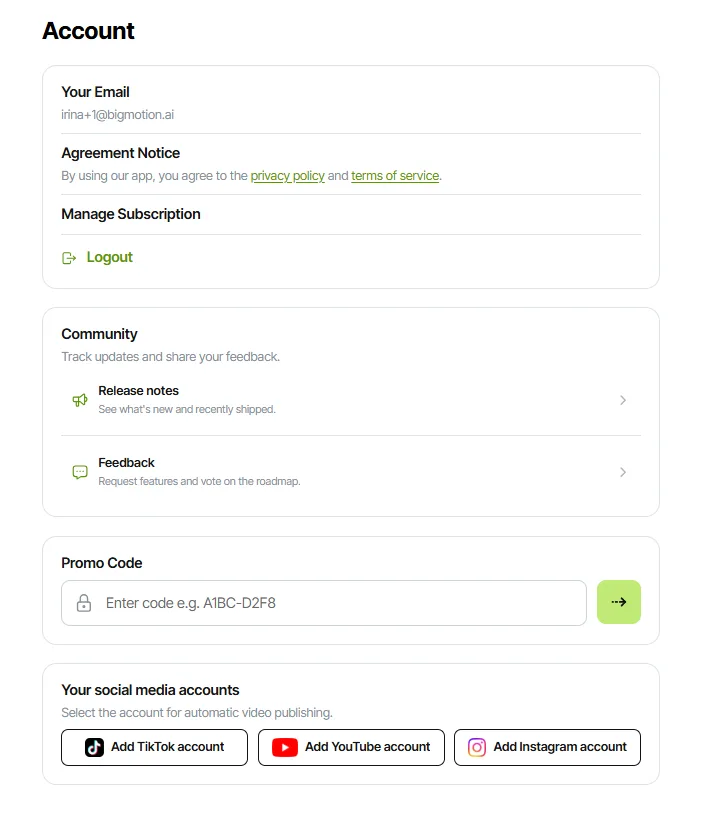
Open your Account settings at https://app.bigmotion.ai/account.
Account Email: The email address linked to your account. Login codes are sent to this address.
💡 To update your BigMotion email address, contact us at [email protected] or use the chat widget. Our support team will help you make the change.
Agreement Notice: Review our Privacy Policy and Terms of Service.
Manage Subscription: Opens the Billing Dashboard, where you can manage your plan, update your billing details, or cancel your subscription.
Log Out: Signs you out of the app.
Release Notes: View the latest product releases and updates.
Feedback: Share your ideas for new features and vote on suggestions from other users.
Your Video Accounts: View the social media accounts connected for automatic posting.
💡 There is currently no in-app option to delete or pause your account. To delete your account and remove all associated data, or to pause it temporarily, contact support at [email protected]. We will process the request for you.
No items found.