
Signing In to Your Account
After purchasing a subscription, you will be redirected automatically to the app. You can also visit https://app.bigmotion.ai/ to set up your account.
💡 Make sure you use the same email address that you used to complete your purchase.
You can also sign in with your Google account. Just make sure the Gmail address matches the email address used to purchase your subscription.
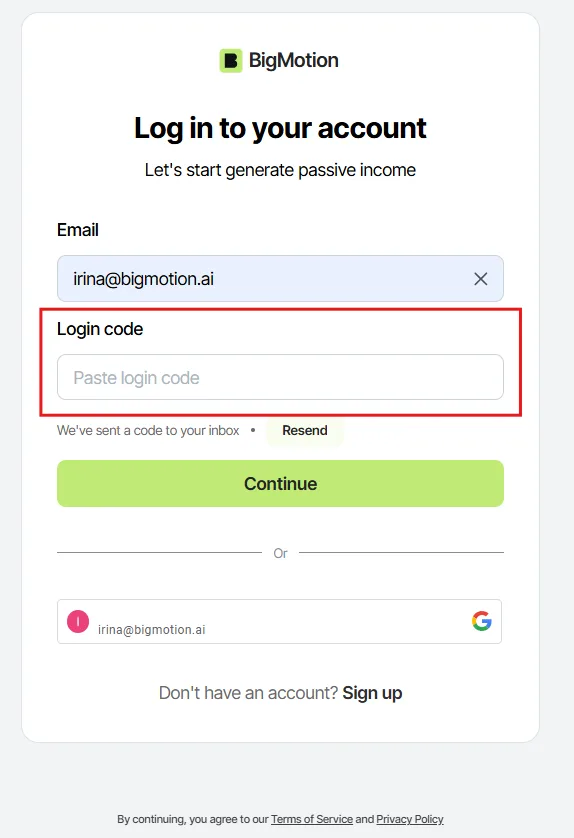
- Enter your registered email address and click “Continue”.
- A field for entering a verification code will appear.
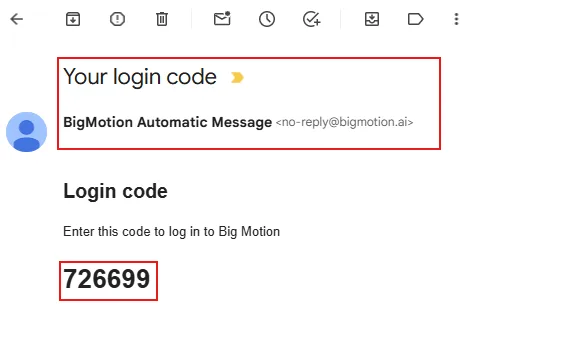
- Check the inbox associated with the email address you entered. The code will be sent from [email protected] with the subject line “Your login code.” The example below shows what the email looks like:
- Copy the code and return to the BigMotion login page.
- Enter the code to sign in or create your account.
You’re all set. Welcome to BigMotion! 🎉
No items found.