Simpleshow Video Maker
Create engaging explainer videos that turn complex topics into simple, compelling stories. BigMotion transforms any script into professional explainer videos for YouTube, Instagram, and Facebook — no production team, no software, no experience required.
Simpleshow Video Maker Features



How to Make a Simpleshow Video
🎬 Stop complicating. Start creating.
Write Your Explainer Script
Describe your business idea, company process, service, or historical event — or use the AI Script Builder to generate a clear, structured script in seconds. No production or design experience needed. Simply write your message and let BigMotion do the rest.
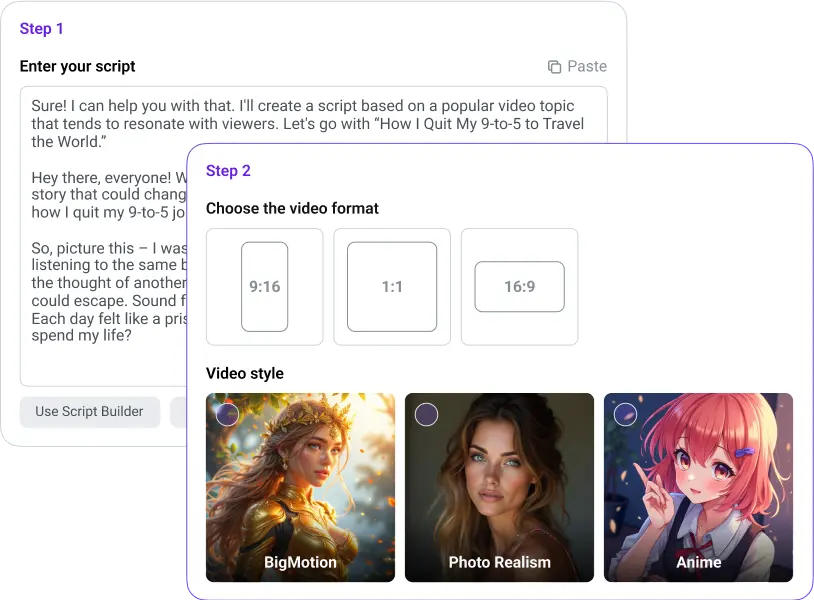
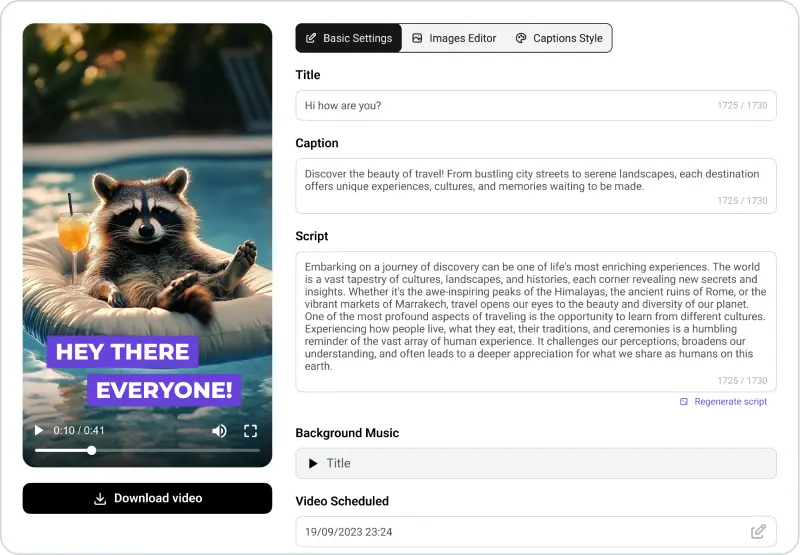
AI Generates Your Explainer Video
BigMotion analyzes your script and builds a complete, simple-show-style explainer video with matching visuals, AI-generated voiceover in multiple languages, animated captions, and background music. Complex topics become simple, watchable stories your audience will actually engage with.
Download & Share Your Explainer Video
Your explainer video is ready to download in HD and publish directly to YouTube, Instagram, Facebook, and other platforms. Share internally for change management and training, or externally to introduce your company, product, or service to a wider audience.

Perfect For:
Businesses & Marketing Teams
Educators & Students
Entrepreneurs & Startups
Unlock your series
Pro
Scale your series across platforms
By confirming your payment, you enroll in a monthly subscription to BigMotion for $39 / $89 / $179/month after a $19 / $39 / $79 first 1-month trial, giving you full access to our premium features and services. Your subscription will renew automatically each month until you cancel. You may cancel at any time by contacting us at [email protected]. See our Terms of Service and Subscription & Refund Policy for more details.
Simpleshow Video Maker FAQ
A simpleshow video maker is an online tool that turns written scripts into clean, simple explainer videos — the kind that visualize complex topics through illustrated scenes, voiceover narration, and background music. BigMotion replicates and extends this format using AI: you write your script, choose a voice and visual style, and the platform automatically generates a fully produced explainer video. No explainer engine to configure, no software to install, no production experience required.
You can create marketing explainers, product demos, onboarding videos, change management content, school and training materials, company process videos, and more. BigMotion supports multiple languages and 50+ voices, so your explainer videos work for any audience — whether you're presenting to a German-speaking team or a global YouTube subscriber base.
Yes. You can upload your own images to replace auto-generated scenes in any video, and you can choose between AI text-to-speech narration or record your own voice for a more personal feel. Background music tracks can also be selected or turned off entirely, depending on your message and context.
BigMotion offers the same core ability to create explainer videos from a script — but without the limited free plan, feature paywalls, or rigid explainer engine. Video generation uses credits from your subscription plan. The Basic plan includes 1,900 credits per month (~14 Autoshorts). Each generation consumes credits based on the AI model selected.